Simple Video Flash Player Module 1.6.5 (new)
This Module is a Simple Video Flash Player for Joomla 1.5.x and is based on the JW player. Is easy to use!
This Module is a Simple Video Flash Player for Joomla 1.5.x and is based on the JW player. Is easy to use!
Get the Flash Player to see this player.

Features
*Plays a single video file from a URL or unlimited video files from a XML
playlist
*Plays youtube videos
*It supports playback of any format the Adobe Flash Player can handle (FLV, MP4,
MP3, AAC, JPG, PNG and GIF)
Settings
*Change player settings
*Video file properties
*Playlist settings
*Display a preview image
*Insert your own logo on movie load
*Url to an external page
*Autostart, Repeat and Shuffle settings
Update version 1.6
*Player update (Version 4.4)
*Display a fallback image
*Controllbar settings(Over/Bottom)
*Skin settings
*Plugin settings
3. How can i create a XML playlist?
Here is an overview of all the tags of each format the player processes, and the flashvars they correspond to:
| Flashvars | XSPF | RSS | SMIL | ASX | ATOM |
| author | creator | itunes:author / media:credit | #.author | author | media:credit |
| date | meta rel=’date’ | pubDate | #.date | param name='date' | published |
| description | annotation | description | #.alt | abstract | summary |
| duration | duration | itunes:duration / media:content | #.dur | duration | media:content |
| file | location | enclosure / media:content | #.src | ref | media:content |
| link | info | link | anchor | moreinfo | link rel='alternate' |
| image | image | media:thumbnail | img | param name=’image’ | media:thumbnail |
| start | meta rel=’start’ | media:content | #.begin | starttime | media:content |
| tags | meta rel=’tags’ | itunes:keywords / media:keywords | #.tags | param name='tags' | media:keywords |
| title | title | title | #.title | title | title |
| type | meta rel=’type’ | media:meta | #.type | param name=’type’ | media:meta |
| meta | meta rel='xxx' | media:meta | #.xxx | param name=’xxx’ | media:meta |
Each format has a meta element, which can be used to load additional data into a playlist. For example, the accessibility plugin can pick up the captions meta elements from playlists, so you can build a playlist of files that contain closed captions.
Example RSS media playlist
http://www.longtailvideo.com/jw/upload/mrss.xml
4. How can i create a youtube playlist?
Go to the Youtube APIs and Tools page http://gdata.youtube.com/demo/index.html
-click playlist get
-add your youtube playlist id (look at your account)
-click submit
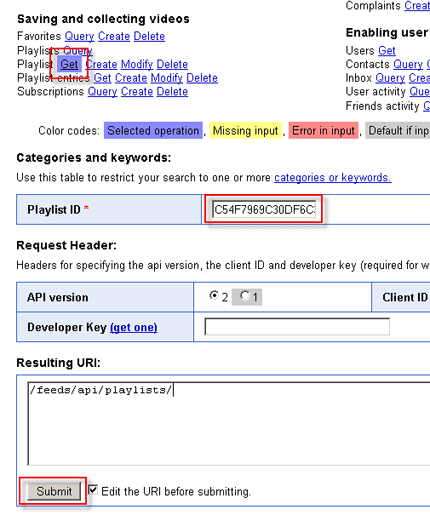
Example Youtube playlist
http://gdata.youtube.com/feeds/api/playlists/C54F7969C30DF6C3
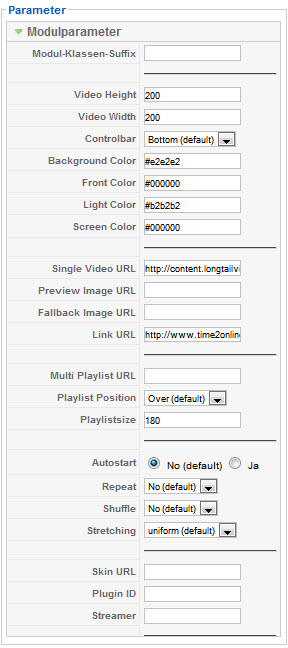
5. How do I set up and configure the Simple Flash Video Player Module?
Get the Flash Player to see this player.
Get the Flash Player to see this player.
Get the Flash Player to see this player.
Get the Flash Player to see this player.
Get the Flash Player to see this player.
Get the Flash Player to see this player.
Get the Flash Player to see this player.

Get the Flash Player to see this player.
Get the Flash Player to see this player.
Get the Flash Player to see this player.
Get the Flash Player to see this player.
Get the Flash Player to see this player.
Get the Flash Player to see this player.
Get the Flash Player to see this player.
Get the Flash Player to see this player.
Fragen kommen immer wieder auf. Der Support ist daher ein sehr wichtiger Teil unserer Dienstleistung, bitte zögern Sie nicht uns bei Unklarheiten oder Problemen zu kontaktieren.
Sie haben eine Frage, wünschen mehr Informationen oder ein Angebot? Hier können Sie gerne mit uns in Kontakt treten.